Showing posts with label Gadget. Show all posts

Tuesday, 1 February 2011

APPLE IPAD; A REVIEW

The technology and its advancement is remarkable. In the field of computers and calculating devices, it has progressed even more. The amount and variety of the tech products now available is unparallel. The first computers were made in the fifties. They were of enormous sizes and costed a lot. But now, its totally different. Even plenty of Hand-Held computers with all the functionalities and low prices, are available. Out of those, iPad from Apple Inc. is one of the best technology gadgets we have ever seen.
Apple's iPad is considered as a computing revolution. It has been a subject of debates about the future of technology and media. It has made a great impact on the minds of people. Having being such a device, its really expensive too. The iPad costs from $500 to $850 depending on difference in Wi-Fi, 3G and Storage Capacity. It is one of the best sellers. nearly 2 million pieces were sold within 2 months of its official release.

HARDWARE:

The iPad comes with a 9.7-inch display, a 1024x768 resolution, LED backlighting, a fingerprint reader with a capactive touch and scratch resistant oleophobic coating. For the Non 3G version, it weighs 680g, and 730g for the 3G version. It has a 1 GB, A4 Apple processor and it comes in three ranges of capacity, i.e, 16, 32, and 64 GB. It has a 2.1+EDR and a 802.11a/b/g/n Wi-Fi for better internet connectivity. The iPad has a digital compass. There's also a GPS onboard in the 3G version and both versions have an ambient light censor and accelerometer. It also has a built-in microphone and a built-in speaker. The iPad ressembles a large iPhone and more likely to an iPod Touch. Its not super heavy but it does has a healthy solidness to it.
SOFTWARE:

The iPad is running a modified version of the iPhone that is OS 3.2. It has some new user interface additions. It is upgradable upto OS 4.0. The software used in the iPad has only a few changes from the iPhone software. The common change is the modification of the apps for this size screen.

APPLICATIONS:

Every installed application has been upgraded and recoded for the larger screen. Some of the notable iPad apps iclude Safari for a better internet experience, Mail, Calendar, Youtube, iPod, iTunes, App store, Maps, Notes, Books, Spotlight search etc. Most of the applications used in the iPad are the modified and upgraded forms of the apps used in the iPhone.

DRAWBACKS:

Like any other gadget, it has some drawbacks as well. The modern generation computer without a camera is incomplete. Yes, the iPad doesn't has any built-in camera. This device doesn't supports Flash also, which is also a big drawback. Multi-tasking is not accessible. Browsing without listening to the music, sounds pathetic. Some other failures of this device include the unavailability of USB Ports and storage capacity limitations. Thats a nightmare.

Although the iPad has some failures and drawbacks, it is still a computing revolution. The technology will continue to advance and we will definitely see yet another remarkable device, possibly in the near future.


apple ipad

Tuesday, 18 January 2011

Motorola DROID Pro Review

Motorola DROID Pro. The name just sounds intimidating and serious. The iPhone captured the market by being fun and approachable, and Google took that a step further with Android by opening up the platform, making it customized and personal. But when you add “pro” to something you’re not messing around, and that’s exactly what Motorola is doing with their latest offering for Verizon Wireless. The Pro aims to take on the BlackBerry segment,

something Android has been garnering attention from anyway, but more specifically the BlackBerry power user, many of which have thus far resisted the lure of the little green robot. From the portrait QWERTY orientation to the lightning fast performance the Motorola DROID Pro is squarely aimed at the suits, but will it be enough to win over this fiercely loyal user base?

Included with the Motorola DROID Pro you will find:

Li-Ion battery
AC adapter with international adapters
USB cable
2GB microSD card
Design

The Motorola DROID Pro may share a form factor with BlackBerry, but it sure doesn’t feel like one. For starters it is narrow and tall, and the screen is very large. BlackBerry devices typically have displays of about 2.4 inches, orientated horizontally, but the DROID Pro features a 3.1” display in portrait orientation. This leaves less room for the keyboard in both dimensions, and as such the keyboard is much more cramped than you would find on a Curve or Bold. Motorola attempts to use the flared key design like we’ve seen with the Bold and Style, but the keys just don’t feel as natural on this device. Because the screen dominates the phone the bottom row of keys ends up at the very bottom of the phone, and this makes using it a bit awkward, similar to what we felt with the sides of the BlackBerry Style. A top-flight BlackBerry keyboard this is not, but that said it is still pretty good. Auto-correct generally fixed the mistakes we made, though in a typical few sentence email we would have to make one or two corrections ourselves, and as with any keyboard we got more used to it the more we used it.

The overall size of the Motorola DROID Pro is good. It has roughly the same footprint as the DROID 2, but is considerably lighter. This is because the device is mainly plastic. Motorola used high quality materials for the Pro, but we would have preferred a soft-touch back instead of the hard plastic they opted for. Nonetheless the DROID Pro feels quite solid in the hand and we don’t have any issues about its build quality.

The 3.1” display is good but not great. It has a resolution of 320x480 and is bright enough to be read in most lighting conditions comfortably. As you might expect it is a multi-touch capacitive touchscreen. It is plenty responsive and offers haptic feedback where appropriate. It surprised us that the screen was not rotating when we turned the phone, but it turns out the auto-rotate feature appears to be turned off by default on the DROID Pro, so a quick trip to the settings menu fixed that.

The Motorola DROID Pro has the standard four Android navigation keys below the screen. They are capacitive and integrated into the display, separate from the keyboard. On the left side are the volume rocker and microUSB charging port (which glows white while charging) and on the right is a programmable key much like BlackBerry convenience keys. The power button and 3.5mm headphone jack sit atop of the DROID Pro. The stylized back door houses the 5 megapixel camera with dual LED flash at the top left, and the DROID Pro’s single speaker centered near the bottom.

Overall the Motorola DROID Pro offers a good blend of size and functionality in this relatively new form factor for Android. The phone feels good in your hand, and when turned on its side the keypad doesn’t get in the way too much. While that keyboard isn’t as good as what you’d find on the BlackBerry Bold, it is still quite usable and will help the business crowd ease into the transition from their BlackBerry into the DROID Pro.

Source: Phonearena.com


Motorola DROID Pro mobile

Acer Revo 100 Media PC with 3D Bluray Support

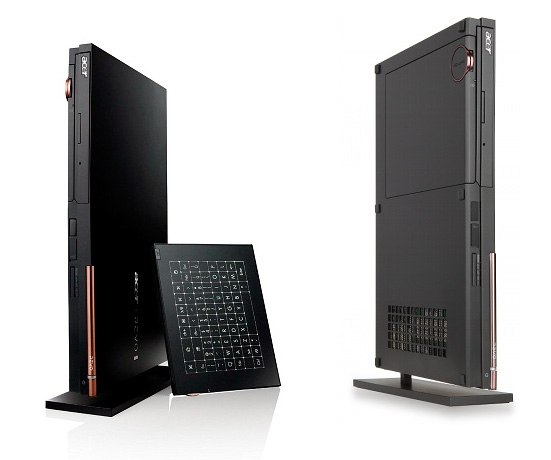
Acer has launched a new PC here in the UK, the Acer Revo 100, and it is designed to be a compact PC, with a wide range of features, and is designed to be used as a HTPC with your HDTV.

The Acer Revo 100 features a slim design, and it can be used in both horizontal and vertical modes. The Acer Revo 100 features an Athlon II Neo dual core processor, and the second generation NVIDIA ION graphics,

as well as 4GB of DDR3 RAM, plus there is also a built in Blu-ray player, which is compatible with 3D Blu-ray.

Other specifications on the Acer Revo 100 include, up to 750GB of storage, Dolby Home Theater v3 HD, HDMI, two USB ports, Ethernet, optical audio out and it also comes with a wireless touchpad which can be used to control it.

The Acre Revo 100 comes with Microsoft Windows 7 Home Premium 64 Bit, and it is now available in the UK for £599.


Acer Revo 100 Media PC

LG Optimus One P500 review

The LG Optimus One may not be your average killer gadget, but it sports a tempting pricetag, solid build, a nice looking set of features and Android 2.2 Froyo. And with the Optimus One in your hand, you are free to mock and tease those seemingly superior phones, which are still stuck on Eclair – now that's priceless!

Indeed, the Optimus One offers an awesome price-to-features ratio among modern Android smartphones. With 1 million units sold already, the LG Optimus One P500 seems to be a popular option and it’s not difficult to see why.

True, it's only got a moderately clocked CPU running at 600MHz, but with the performance boost from Froyo it feels reasonably fast and responsive most of the time and the plenty amounts of RAM give it enough app-toggling punch. Here go the rest of the specs:

Key features:

3.2" 256K-color capacitive TFT touchscreen of HVGA resolution (320 x 480 pixels); Multi-touch input
Quad-band GSM/GPRS/EDGE support
Dual-band 3G with HSDPA (7.2 Mbps)
600MHz CPU running Android 2.2 Froyo; 419MB RAM
3 megapixel autofocus camera; face and smile detection, geotagging
VGA video recording @ 18fps
microSD card slot, up to 32GB, 2GB in the box
Standard 3.5mm audio jack
Standard microUSB port (charging)
GPS receiver with A-GPS; Digital compass
Wi-Fi b/g; Wi-Fi hotspot functionality built-in
Bluetooth 2.1 with A2DP
Accelerometer for screen auto rotate; Proximity sensor
FM radio with RDS
Office document editor
Portrait and landscape on-screen QWERTY keyboard
Social networking integration
DivX/XviD support
Smart dialing
Excellent loudspeaker performance
Main disadvantages:

Slow CPU makes editing Office documents a chore
Camera is just 3MP, has no lens protection, no flash and no dedicated shutter key
No Flash support in the browser despite Froyo
No front facing camera
Digging inside the camera settings you can almost get lost – smile shots, face detection, face-tracking effects, beauty and art shots and so on. At 3MP it’s a no-frills camera but certainly one for casual users to have so much fun with.

Then there are the Facebook and Twitter apps which come preinstalled and the video player has DivX/XviD video support – the LG Optimus One P500 knows good fun. There’s a serious side to it as well, the Office document viewer/editor will help you get some work done.

Overall, the Optimus One can’t compete in the Android big league but great value for money is likely to draw many people away from feature phones (which is a huge market to tap into).

It’s not without its limitations – editing a complex Office document is painfully slow and video playback stops short of VGA resolution.

But when you’re buying cheap, you know you’ll have to make compromises.

Source: GSM ARENA


LG Optimus One P500

Review of the Q2 Internet Radio

The Q2 Internet Radio asks users to boil down the thousands of available online radio stations and choose just four. This may appear to limit choice, but actually reflects the fact that most of us only regularly listen to a few stations anyway. The device also does away with display screens and has only one button – an on/off switch. To change a station, you tip it onto another of its sides. To increase volume, you raise the front of the unit, and raise the back to lower it. I've been given the chance to take one for a test run, so read on for my thoughts.

The Q2 is available in five colors. The setup application launched an online installer which downloads the Windows XP/Vista/7 or Mac OS X Q3 Internet Radio program to the computer or laptop. Installation is quick and painless, after which it was time to turn on the device and connect it to my laptop. A blinking amber light behind the speaker grill at the top right informed me that my laptop was charging the Q2's Li-ion battery. There was also a red LED flashing at the bottom left – its purpose will be revealed shortly. After following a few onscreen prompts to get all the drivers in the right place, it was ready to be configured by the downloaded software.

Simple software interface

There are three tabs across the top of the program's colorful interface, labeled Stations, Networks and Settings. Adding your home network is as simple as dragging from the list of available networks shown in the left column of the Networks tab, and dropping it in the right column. If you use network security, you'll then be asked for the key.

After a few nervous moments, the network status indicator lost its red cross and lit up green, and the red blinking LED on the Q2 was replaced by flashing green. When the assigned station is found, this green LED stops flashing, and the audio begins.

To increase the volume, you tilt up the front of the device, and tilt up the back of the unit to lower it. At the higher volume, the 2.4-inch speaker driver packs a surprisingly loud punch for a unit of this size, with no noticeable distortion. There's no method to alter the EQ (which is a bit of a pity) and my tastes wander towards slightly more bass than that offered by default but, like most speakers, placing the device near a wall or in a corner adds a bit more bottom end to the output.

The sides of the cube are to switch stations. Each took varying lengths of time to locate the correct station, from fairly brisk to a couple of worryingly quiet seconds. This is dependent on station response time, not the device itself, as I'm sure regular online listeners will know only too well.

To mute the radio, it's tipped onto its face. After ten minutes in this position, the Q2 will enter battery-saving sleep mode.

Adding your own stations

To add your own stations, you can choose to browse through the suggestions offered by the software or, use the search box to locate favorites. Once you've found what you're looking for, the interface gives each station a useful reliability score. To the right of the screen are iconic representations of the four assignable sides of the radio, with stations being added to the radio by clicking and dragging from left to right.

The settings tab allows control over the device's initial volume and software interface language, and lets you know if any new firmware is available. For the security conscious out there, user information is not harvested by Armour Home.

At this point the radio is ready to use and can be disconnected from the computer or laptop. If you don't want to listen while the unit is charging, then the company advises lowering the volume so that the amber light is still in view – or, you can mute it if you're not too bothered about keeping an eye on the charge progress (perhaps a useful future addition to the software would be a battery level indicator).

A full charge is indicated by a steady amber light, which is said to take about three hours from empty. The battery will last for at least eight hours of constant use at mid-range volume before needing a top-up.

The company's Steve Reichert said the aim was to have the unit locate and connect to a home network in about 40 seconds from cold, but this will vary according to local conditions.

Play time

I spent the next few hours putting the onboard accelerometer through its paces, tipping and tilting around the house. Experience with my netbook has told me that there are a few troublesome signal strength cold spots here and there, but I have to say that the sound from the Q2 did not seem to suffer to any noticeable degree as I bounced from room to room.

I took the radio to the shed at the bottom of the garden and enjoyed a brief moment of pottering – it was freezing out there – before returning to the comfort of the warm kitchen. The range of the Q2 is of course dependent on the reach of your wireless broadband router. I found that I was able to wow the neighbors on the corner of the street (about 45 feet from my router) before the signal was lost.

I hooked up the device to my netbook – which runs on a different flavor of Windows than my laptop – and repeated the software install process. I'm told that there is no limit to the number of times you can download and install the software, whether you're wanting to have the software on your work computer or just show off the Q2 at a friend's house.

I changed the stations via the netbook and spent another hour or so tilting and tipping around the house again... I'm sure that this novelty will wear off, eventually!

Lasting impression

The Q2 Internet Radio is as cute as a button and has proved to be a genuine conversation piece. I'm suitably impressed by its ease of use and the beautifully simple instruction manual and software interface. I can't remember getting a clearer sound from a speaker this small – even at higher volumes – and the virtually buttonless design has been universally well received. People just can't stop playing with it.

Carrying the Q2 around the house is helped by the sides of the cube being coated in a non-slip material. On the down-side, this surface does seem to be a magnet for dust, which had an unfortunate knock-on effect. It meant that I had do some housework before taking the gallery shots!

While handling the device for various photo opportunities, I did find that I was accidentally altering the volume or changing stations, but under normal use this is unlikely to present a problem.

The Q2 Internet Radio is available now and costs GBP90 (US$142), which includes shipping within the UK. There's a flat rate international shipping fee of GBP10 (US$15) for most international destinations.

Source: gizmag


Q2 Internet Radio

Sony’s new Nex-5 Camera Review

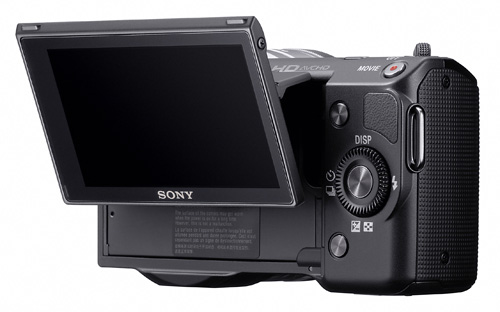
The Sony NEX-5 is one of two models in Sony’s new mirrorless interchangeable lens camera range, the NEX-5 is the more expensive of the two models and come with more features.

Specifications

The Sony NEX-5 features a 14.2 megapixel Exmor APS HD CMOS sensor, and Sony’s E-mount lens system, it has an ISO range of 200 to 12,800 and it is capable of recording HD video in 1080i at 60 frames per second. There is a 3 inch LCD display on the rear of the camera, which can be tilted, the display features a 9210,000 dot resolution, and it also comes with a compact clip on flash.

The Sony Nex-5 uses Sony’s E-mount system, which you can use specific E mount lenses with and also a range of Sony Alpha lenses using an optional adapter.

Design And Functions

The Nex-5 isn’t much larger than many of the compact cameras on the market today, I was quite surprised how small it was without the lens, but as soon as you add on the standard 18-5mm lens, it adds quite a bit of weight to the camera, although it still feels compact and light when compared to a DSLr.

The design of the camera is very nice, and it certainly feels like a well built camera, it takes a bit of getting used to using all the different functions on the Nex-5 and controlling all the menu options is done on the display.

The menu screen is pretty good, and you can easily navigate though all the different settings, there are quite a few different standard shooting modes to choose from as well as some manual ones where you can choose the majority of the settings you want to adjust yourself.

Features

The Nex-5 has a nice range of features and settings for shooting different types of photos as well as shooting video, one of these features is a Panorama mode, that will let you shoot a range of photos in progression, the camera then stiches them together to produce a panoramic photo, you can see and example of this below.

Picture Quality

The picture quality on the NEX-5 is pretty impressive, it does a great job at creating sharp and clear photos at the lower end of the ISO range, when you start going above ISO 6400 you tend to notice a bit more of a loss of detail.

There are a wide range of different shooting modes on the NEX-5 including manual, shutter priority, aperature priority, program auto, intelligent auto, plus a range of scene selection modes, which are designed for different conditions.

The majority of these modes do a good job at taking decent photo’s, and the ability to choose which setting you want to adjust in the manual mode is definitely a plus, and it makes the Nex-5 feel closer to a DSLR than a compact camera.

Conclusion

What we liked about the Sony Nex-5 is that you get many of the features that you would find on a DSLR, the ability to change lenses when you need to, plus the range of features on offer make the NEX-5 an excellent camera.

Don’t expect it to replace you DSLR, as you wont find all the functionality and customization that you would in a DSLR, but it could be used as an alternative in a lot of situations. The portability is a definite plus point, and I would definitely use the NEX-5 over a compact camera, as you get a lot more flexibility it how it can be used.

I would say the Nex-5 is ideal for people who want more than a compact camera, but don’t want to go for a full DSLR, Sony have done a pretty good job with it, and I have to admit I was quite impressed with my overall experience with the Sony Nex-5.

Source: Geeky Gadgets


Nex-5 Camera

iFlash improves lighting on your iPhone pics

For those who want a little bit more flash for their iPhone might want to invest in this little add-on. I think most iPhone users know that the camera is needed for the quick snap, but the flash isn’t always the best. This is what the iFlash is, an handy iPhone accessory that can not only bring light to your pictures, but can be used as a handy flashlight. You should be able to get it now for £19.99.

Source: image acquire


iflash

Nokia C6 Review

Nokia C series started as an entry-level series since June 2010, when the first C1 and C2 handsets were launched, but continued to upgrade, as more advanced devices have been thrown on the market. Lately, we had Nokia C3, which could easily be taken as an Eseries device, and then we had Nokia C5, which is a powerful candy-bar smartphone that strongly resembles the older Nokia 6300 phone. Nokia C6 can be considered a cheaper version of the N97.

The Symbian smartphone includes all the important features that you would want from a mid-level device, without offering any high-end, innovative functions. On the other hand the slider is not lacking any important specs. And to make it even better, the Finnish handset manufacturer is offering all these at an affordable price.

Design

Nokia C6 bears the same mark as some of the XpressMusic smartphones that feature a QWERTY keyboard and touchscreen display. If you take the 5800 XpressMusic phone, which was launched on the market two years ago, and put it side by side with the new C6, you'll notice that the resemblance is astonishing. And this is not the only handset that looks exactly like the first Nokia smartphone to feature a touchscreen display. This surely tells something about the manufacturer, who is focusing more on features and less on design.

But let's cut to the chase and see how's this smartphone on the outside. Nokia C6 features a 3.2-inch touchscreen display that covers almost the entire front part of the smartphone. Above the display, next to the earphone speaker, there's a secondary camera and a small light ambient sensor. Below the large display, there are three physical keys, much like those of Nokia 5800.

The middle key is flashing all the time at a low pace, but it's also able to notify the user of a missed call or received message, as it starts to flash more frequently. The right side of the phone features two volume keys, an locking/unlocking slide key, and a dedicated camera button. The microSD card slot for memory expansion has been placed on the left side of the handset and is covered by a long plastic stripe. On the bottom of the device, there's a small charger port, while on top you will notice the microUSB port and a 3.5mm audio jack.

Nokia C6 slides to the right to reveal a full QWERTY keyboard with 39 keys and a big D-pad to the right. The keyboard has been split into two, as you can see from the screenshots. This might be a little confusing at first, but as you start using it often you'll get use to it. The keyboard is made from a cheap plastic, which shows as soon as you touch it. Well, at least the keys are responsive and the space between is wide enough, so texting won't be much of a problem with Nokia C6. The backlighting is also decent enough, so users will be able to text even in darker environment. I don't have any doubts regarding the sliding mechanism, which seems to be very solid.

The 5.0-megapixel camera on the back of the phone features a small LED flash upwards, but lacks any protective lenses. There's also a small loudspeaker placed to the right of the camera module.

The battery cover, as well as the whole back part of the phone is made from a cheap plastic, which is in deep contrast with the stylish plastic that covers the front part. Oh, well, at least the back of the phone won't be full of smudge like the front part will be after 2 minutes of use.

Overall, the phone looks compact and “mundane”, as it doesn't come out with anything new, nor will stand out from the crowd.

Display and Camera

Nokia C6 features a TFT 3.2-inch resistive touchscreen that supports 16 Million colors and 360 x 640-pixels resolution, which can also be controlled with a stylus if you have one, as the sales package doesn’t include one. Well, it's a resistive touchscreen, so don't expect miracles, as it cannot be compared with devices sporting capacitive displays.

The quality of the image is unquestionably good, including brightness and contrast - at their highest level, but it becomes poor when it's exposed to sunlight. The phone also features built-in accelerometer for display auto-rotation, as well as turn-to-mute function.

The 5-megapixel camera of C6 features autofocus, LED flash, geotagging and a pretty standard interface. Further, the camera lacks new advanced functions such as smile detection, face recognition or blink prevention. The camera UI seems to be the same as the one embedded in Nokia 5800 and N97.

The camera can take pictures with a maximum resolution of 2,592 x 1,944 pixels and saves the images pretty fast. All the settings and functions can be displayed on the touchscreen: Contrast, White Balance, ISO, Sharpness, Exposure compensation, Color tones and many more.

There's also a touch-n-shoot button on the screen, which enables users to take pictures with a simple touch instead of using the dedicated camera button. Unfortunately, the touch button lacks the "half way press" function, so you will miss the autofocus feature if you decide to use it.

The phone also has a secondary videocall camera that can be used to take pictures. The main camera can shoot clips in VGA mode at 30FPS, while the secondary can record videos in QVGA mode at 30fps. As you can see from the samples below, the pictures taken with C6 camera are not amazing, but they're decent.

Menu and Software

Nokia C6 runs Symbian 9.4 operating system, with S60 5th Edition interface, the same as its N97 mini predecessor. Little to no improvements have been done to the graphical interface, instead the UI is now even poorer in options and menus. Well, at least now you will enjoy the kinetic scroll feature, that was so needed when Nokia 5800 hit the market.

The only changes I noticed is on the 'surface', as the home screen have been improved a little. In fact the new C6 homescreen is a mix between a widget-style screen and the usual Active Standby. Still, do not expect to get more customizable homescreens, because you'll be disappointed.

Nokia C6 features only one homescreen that can be customized to display various widgets, in thumb-able blocks, which can be arranged or hidden. To hide the whole set of widgets that appear on the homescreen, simply swipe your finger to the left or right. Do the same thing to make them reappear. Clicking near the battery icon, on the upper right corner of the homescreen will give you quick access to the clock and Connectivity area, where you can enable/disable Bluetooth, Wi-Fi and other stuff.

To bring up the Main menu key, click the middle key under the screen, choose Options/Organise, to rearrange the menu as you see fit. The Home screen features the same customizable Shortcut bars that contain icons of the applications that users have previously set. They are now functioning like widgets too and offer a little bit of entertainment to the common user.

You will find applications that come pre-installed with the phone together with the clock, notes, office, recorder and other Symbian-specific functions.

The device has a variety of input methods: stylus (not present in the sales package), plectrum and finger touch support for text input and UI control, but the best by far is the full QWERTY keyboard.

Some of the key applications that come pre-loaded with Nokia C6 include: complex calendar, notepad, calculator, converter, file manager, recorder, Drawing, Traveler, Font Magnifier, Shazam, Associated Press Mobile, Bloomberg, CNN Video, ESPN Soccernet, Facebook, Friendster, Hi5, MySpace, Slideshow. There's no media sub-menu, but you get some dedicated apps under the Music menu: music player, Stereo FM RDS Radio, Ovi Music.

There's also a YouTube client, PDF reader and QuickOffice applications, which can only be used to display documents, but you cannot edit any unless you pay for an upgrade. You can also entertain yourself with the addictive Bejeweled Twist game, developed by PopCap.

Communication

Nokia C6 is a quad-band GSM (850 / 900 / 1800 / 1900) handset, HSDPA 900 / 1900 / 2100 (3.6 Mbps) compatible, which features GPRS class 32 (100 kbps), EDGE 32 class (296 kbps), and Wi-Fi 802.11 b/g. This makes it an all-rounder when it comes to data transfer or connectivity in general.

With the quick to access shortcut on the Home screen setting up you connections (Wi-Fi, Bluetooth) is now very easy, even though you will have to click twice to get where you need.

The integrated browser is the same that you can get in the older N97 phone, but got small improvements and bug fixes. It has now full Java and Flash support, and the latter is working nicely. You will be able to watch YouTube movies using the browse, but it seems that because of the rather small-sized display, you won't see the whole frame of the clip fitting onto the screen.

The handset features a GPS receiver, which works in conjunction with Ovi Maps. I have tested the localization times and noticed that Nokia C6 is decent enough. The built-in GPS receiver features the A-GPS function, which makes localization even faster. It quickly pin-points you even when the phone is indoors.

Other connectivity tools include Bluetooth 2.0 with A2DP and EDR support, and microUSB for PC synchronization (no charging).

In terms of messaging, the phone offers a complete solution, accepting all available message types. Furthermore, given the fact that it features a QWERTY keyboard, you'll be able to type your messages faster. The message client works with POP3, SMTP, and IMAP4 protocols, and supports more than one email account. Also, it can download headers or full email, and supports attachments.

The quad-band (GSM 850 / GSM 900 / GSM 1800 / GSM 1900) network compatible smartphone has a very good GSM signal reception. The sound is very good at both ends, and pretty loud too. The vibration alert is also above average in intensity.

Processor and Memory

Nokia C6 is powered by the same ARM11 family processor running at speeds of up to 434 Mhz that has been embedded in N97 model. The device works pretty smooth, but I have noticed some lags when using other applications while the browser is open. I think this is becoming the main issue with Symbian devices, as others are fixed.

The smartphone also features 240 internal memory, but only 200 MB are user free. The memory can be expanded up to 16GB, thanks to the hot-swappable card slot. The sales package also includes a 2GB microSD card.

Multimedia

The smartphone features the same standard looking music player as Nokia N97 and Nokia 5800 XpressMusic, with little to no cosmetic changes. You have five pre-installed equalizer modes: Bass booster, Classical, Jazz, Pop and Rock. Other settings are: Balance, Loudness and Stereo widening.

The device features Radio FM with RDS function as well, but lacks the FM transmitter. Reception is very good, and sound is above average. The Bluetooth 2.0 with A2DP support enables you to listen to music wirelessly.

The 3.5mm jack port is a good addition, as it enables you to change the earphones that are coming with the phone (WH-102). The included video player lacks DivX and XviD codecs, so you'll need to find yourself a third-party application to play these movie files.

All in all, Nokia C6 music sound is pretty decent in all aspects, so it really worths a try.

Battery

The 1,200 mAh Li-Ion (BL-4J) battery has an officially stated life expectancy of 384 hours in standby (384 for 3G) and of about 7 hours in talk time mode (5 hours for 3G). I have noticed that the phone has a very good playback autonomy (30 hours official), whereas the talk time tends to reach about 3 hours at the most, regardless of the network used. I managed to keep the phone for about 5 days, with 25 minutes of talk per day and about 1-2 hours of music playback per day. I would say the phone has a decent battery, much better than other XpressMusic handsets or Nseries smartphones.

Impressions

Nokia C6 is an interesting addition to the Cseries lineup, but does not come up with anything out-of-the-box that might impress users. It's like the manufacturer preferred to put some standard features into an old design layout, just to be sure that the phone will be 100% usable and with as few downsides as possible. That's how the phone feels, incomplete, but all-rounder at the same time.

The Good: There's a long list of nice features that Nokia C6 includes, but I would say that the strong point is the improve performance and usability, compared with other similar Nokia phones, such as Nseries and a few XpressMusic smartphones. Anyway, here are the key highlights of Nokia C6: generous 3.2-inch resistive touchscreen (640 x 360 pixel resolution), full QWERTY keyboard; 3.6Mbps HSDPA support; decent 5.0-megapixel camera with autofocus and VGA@30fps video recording; Wi-Fi connectivity; GPS with A-GPS and free lifetime voice-guided navigation license; microSD card (16 GB supported, 2GB included); 3.5 mm audio jack; Smart dialing; Stereo FM Radio with RDS; Flash support for web browser; decent audio quality; Kinetic scroll.

The Bad: Compared with the huge list of good things, the downside list is pretty short, but might prevent users choose it instead of other rival brands. I think the main problem with the device is the primitive interface, which seems old and poor in customization options, as well as functions. Also I would list here, the poor eligibility of the display under direct sunlight, as well as the lack of camera lens protection and DivX or XviD support. And it would've been nice to be able to edit documents, but the QuickOffice application included requires upgrade for that.

Source: softpedia


Nokia C6 mobile

JVC GZ-HD500 Camcorder Review

It’s the week before Valentine, folks, and one thing you’re going to need if you haven’t already picked it up is a way to record all those spectacular holiday memories. Family, friends, and of course, New Year’s Eve just another week away means you’ll be needing a camcorder, and we’ve got camcorders all this week for you. First out of the box is the JVC GZ-HD500, and I think you’ll like this one even if your pockets aren’t very deep after all the holiday shopping.

The JVC GZ-HD500 camcorder offers a 20x optical zoom with accompanying 200x digital zoom, eighty gigs of onboard storage (which is right around twenty DVDs worth of space), a memory card slot for microSD and microSDHC memory cards, a 2.7 inch LCD display, Laser Touch scrolling, the HD Gigabrid Premium II engine for better video recording, advanced image stabilizers, HDMI output, 1080p video recording, face detection systems, a USB port, and one touch uploading to YouTube.

I like handling JVC cameras, as that Laser Touch bit really improves the ease of use when it comes to working with the display. It’s a bit classier too, which only means so much, but still. The zoom has a good range and the whole thing is pretty easy to work with. You may not be quite as happy about the lack of optical image stabilization systems, but you’ll have a good experience with this, I’d say.

There’s too much to like here not to suggest you have a closer look at the JVC GZ-HD500. It’s not every day you see a relatively inexpensive item show up with this kind of features loadout added on, so if you’re looking for a new camcorder for those holiday memories, try here.

Source: imageacquire


JVC GZ-HD500 Camcorder

Vicon Revue records your life

Have you ever wanted a firsthand account of every single minute of your life? However, if you’re one who likes the sound of this then you should definitely check out the Vicon Revue. This little camera-necklace runs for around $775. Technology wise it is a wide-angle lens capable of taking imagery at a resolution of 640 x 480. Also on board is 1GB of storage good for around 100 hours of video or 30,000 photographs. But that’s not all it has, it’s also got a temperature sensor, infrared motion detector, accelerometer and compass.

Source: imageacquire


Vicon Revue

Nokia Windows Phone 7 Smartphones in 2011

There are some tech industry rumors that simply refuse to die, and today it’s the turn of Nokia and a potential Windows Phone 7 device that’s getting raked over the coals once more. According to sources Microsoft and Nokia have been holding ongoing talks regarding a Nokia-branded Windows Phone 7 smartphone range. The meetings were at the prompt of newly-instated Nokia CEO Stephen Elop, who is the ex-head of Microsoft Business. He suggests that the first Nokia WP7 devices will reach Europe in Q2 2011, with the “characteristic features” of the Finnish company’s products.

The concept has been well raked-over since Elop took over from ex-CEO Olli-Pekka Kallasvuo, but Nokia has staunchly denied any such intentions to look to Android or Windows Phone 7 rather than continuing with its two-pronged Symbian and MeeGo approach.

Source: IDGTechPanel


Nokia Windows Phone 7 Smartphones